In-car adjustments: brake bias, ARB, and more mid-race
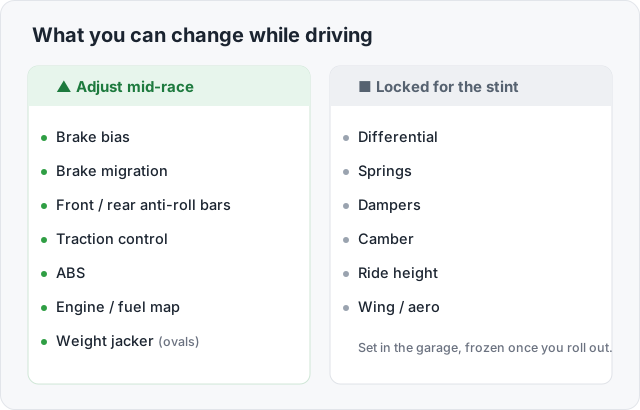
In a typical iRacing GT3 stint you have a handful of things you can change without coming to a stop: brake bias and brake migration, the front and rear anti-roll bars, the traction control and ABS levels, and the throttle/engine map. Ovals add the weight jacker. Everything else, the differential, springs, dampers, camber, ride height, and wing, is set in the garage and frozen for the stint. Knowing which list a setting belongs to is half the battle, because plenty of drivers waste time hunting for a live diff control that does not exist.
The reason any of this matters: the car you qualified is not the car you race. Fuel burns off and the balance shifts. Tires heat, peak, and fade. The track rubbers in over a long race. The live adjustments are how you chase those changes instead of fighting them.
Brake bias, the one you will use most
Section titled “Brake bias, the one you will use most”Brake bias is the live knob fast drivers touch most often. The mechanism and which-way-to-move logic live on the brake bias page; here is the in-race usage.
As fuel burns, move bias rearward. The car gets lighter and the balance shifts off the front, so a touch of rearward bias restores the entry feel you had on a full tank. The community method is consistent: move it back a click every few laps until the rears just start to lock under threshold braking, then nudge it forward one. One driver summed up the whole routine as moving it back “a bit every lap until I feel like I can stop without locking up.”
Bias is also a tire-temperature tool. Overheating the rears? Throw bias forward to take work off them. Can’t rotate the car? Bias rearward. In the rain, move it rearward too: with less grip you brake softer, less weight transfers onto the fronts, and a dry bias then locks the front wheels first. Cars with brake migration give you a second lever, walking the bias forward automatically as pedal pressure rises so you keep rotation early in the braking zone and stability at the threshold.
Anti-roll bars, balance as the track changes
Section titled “Anti-roll bars, balance as the track changes”Most GT3, GTP, and prototype cars expose the front and rear anti-roll bars on cockpit controls. The rule is the same as in the garage: the end you stiffen loses grip. Stiffen the front bar for more stability and understeer; stiffen the rear to free the car and add rotation.
Live, ARBs do two jobs. First, they trim balance per section of a lap, most clearly on the Daytona and Le Mans road-oval layouts. A BMW GT3 driver described running a soft front bar (1) on the banked straights and a stiffer one (4) through the infield: the soft bar on the banking lets the car follow the surface and keep both fronts loaded, while the stiffer bar in the slow infield sharpens turn-in. Second, ARBs let you adapt as the track rubbers in over a long race and the car gains grip you did not have in qualifying.
On doing this corner by corner, the honest consensus is that a few of the very fastest drivers do, but most do not, and several said the fiddling cost them more than it gained. Adjust when you feel a problem, not on a schedule.
Traction control and ABS levels
Section titled “Traction control and ABS levels”On cars that model real electronics, GT3, GTP, and the hybrid prototypes, traction control and ABS are themselves adjustable, usually on rotary switches. These are not the sim’s assists for new drivers; they are the car’s own systems, and you tune them to conditions and tire state. The general rule from quick drivers is to run TC as low as you can comfortably control, because every bit of intervention costs exit drive. A typical GT3 dry range is around 2 to 4, two or three clicks higher in the wet, and a click up late in a stint to preserve a fading rear tire at a small pace cost. There is plenty of disagreement, since TC settings differ by car, track, and even corner, so treat any number as a starting point. ABS in ACC is famously left near 2 or 3 on most cars and rarely touched, as community setup discussions bear out. iRacing’s driving aids support article lists how it treats the broader set of assists.
Engine maps, fuel mix, and hybrid deployment
Section titled “Engine maps, fuel mix, and hybrid deployment”Many cars give you an engine or throttle map on a rotary. The two everyday uses are fuel saving (a leaner map trades a little power for lower consumption, see race strategy) and an overtake/attack map for a short burst of extra performance. On a long fuel-save stint, a leaner map plus lift-and-coast does most of the work.
Hybrid prototypes are the case people get wrong, and the answer flipped in late 2025. iRacing redeveloped the GTP and Ferrari 499P hybrid systems in 2025 Season 4, and the result is more automated, not less. The GTP cars (Cadillac, Acura, BMW, Porsche 963) now run their hybrid fully automatically: there is no cockpit control, the battery holds near a fixed state of charge, and the system blends engine and electric power to match the allowed output at all times, cutting engine power by exactly what the motor adds. Drivers are told to treat them like non-hybrids and brake and accelerate as normal. The Ferrari 499P deploys its front-axle motor only above about 190 km/h, capped at 100 kW, so it is rear-drive below that speed and all-wheel-drive above it; its one driver-adjustable hybrid control is a “cornering mode” added in 2025 Season 4 Patch 3 that trims how much front hybrid drive you get in high-speed corners.
The exception that proves the rule is IndyCar. The Dallara IR-18 hybrid is manual deploy only: a push-to-pass-style boost on a wheel button with an on-screen gauge, where you choose when to spend and recover the energy across a stint, exactly as iRacing’s development update described. So check your car’s control list each season: on the GTP and 499P there is nothing to deploy by hand, on the IndyCar there is.
Ovals: the weight jacker
Section titled “Ovals: the weight jacker”Oval cars add the weight jacker, an in-car control that raises or lowers the right-rear corner to change cross-weight, or “wedge.” More wedge tightens the car (less rotation); less wedge loosens it. You use it to chase the balance as fuel burns and the track changes through a green-flag run, then adjust around traffic and the long left-hand load of the corners. iRacing’s Commodore’s Garage on crossweight explains the geometry. The weight jacker is an oval staple, but it only exists where the real car has one: the Dallara Indy NXT has none, so iRacing does not give it one there.
Reading the car: the black box and your controls
Section titled “Reading the car: the black box and your controls”You cannot adjust what you cannot see. iRacing’s black boxes show live data on the function keys, F2 for standings, F3 for the relative, F4 for fuel and pit, F5 for tires by default, and your current brake bias flashes on screen when you change it. The faster you can read fuel-remaining, lap times, and tire wear at a glance, the better your live calls.
Bind these controls so you never take a hand off the wheel. A button box with rotaries for bias, ARBs, TC, and fuel map turns a fumble into a flick, and a load-cell pedal keeps your braking force repeatable so the bias you dialed in stays honest. For how the live picture connects to your stint plan, see race strategy and tire wear in setup.
Frequently asked questions
What can you actually adjust while driving in iRacing?
On most GT3, GTP, and formula cars: brake bias and brake migration, the front and rear anti-roll bars, traction control and ABS levels (where the car has them), and the engine/throttle map or fuel mix. Ovals add a weight jacker. The differential, springs, dampers, camber, and wing are set in the garage and locked for the stint.
Can I change the differential mid-race?
No, not in iRacing, ACC, or any sim with a real clutch-type limited-slip diff. The diff is fixed for the stint, and the live entry knob you actually have is brake bias. The F1 games are the exception and let you sweep on-throttle diff on the fly. See differential tuning.
Which way should brake bias move as fuel burns off?
Rearward. As the fuel load burns off the balance shifts and the car needs a touch less front brake, so moving bias back keeps the same entry feel. Many fast drivers move it back a click every few laps until the rears start to lock under threshold braking, then nudge forward.
Do top drivers really change brake bias and ARB corner by corner?
Some do, but most adjust per section, not per corner. A common pattern at Daytona is a soft front anti-roll bar on the banking and a stiffer one for the infield. The honest answer from fast drivers is that staying balanced and consistent beats fiddling, so make changes only when you feel a specific problem.
Where do I see fuel, tires, and bias while driving?
iRacing's black boxes show live race data on the function keys: F2 standings, F3 relative, F4 fuel and pit, F5 tires by default. Brake bias appears as an on-screen readout when you change it. Map your cockpit controls to a button box so you can adjust without taking a hand off the wheel.