
A SIM RACING MANUAL APP · iPHONE · WIDGET · APPLE WATCH
This week's track,
on your Home Screen.
iRacing moves every series to a new track each Tuesday. Startlight keeps the answer in view: this week's track and its map, next week's, and a live timer showing how long you have to register for the next session. One widget covers every series you follow.

$9.99 one-time · No subscription · No login · No data collected
The track is the headline.
This card is the real widget, rendered live in your browser with the current iRacing week. Each series you follow gets one. What's on it, in order of why it's there:
This week's track
The headline of the card. It changes every Tuesday when iRacing rolls the schedule to the next week.
Which card you're looking at
Series name, car, and the car photo anchor the card when you cycle through several series.
Next week's track
Where the series goes next and how long until the switch, so you know what to practice.
LIVE · REAL IRACING DATA · THE CURRENT WEEK
Time to the next session
How long you have to register before the next session launches. Inside four minutes it counts in seconds.
The track map
The outline, drawn from iRacing's own map data. You recognize the shape before you finish reading the name.
Home Screen, in the app, and on your wrist.
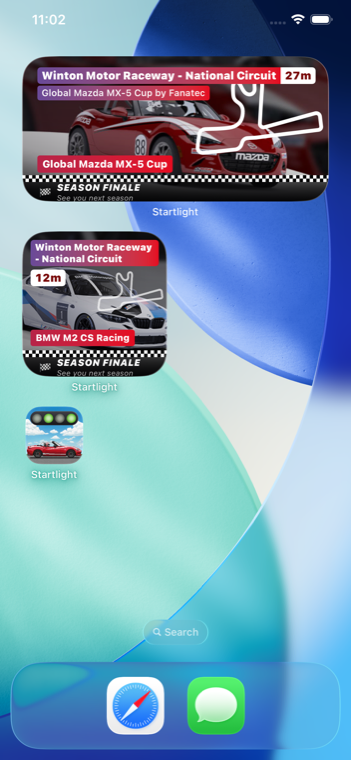
Home Screen widgets
However many series you run, they share one widget.
Tap the iOS widget to cycle through and see up-to-date information on each of your selected series (demo above).
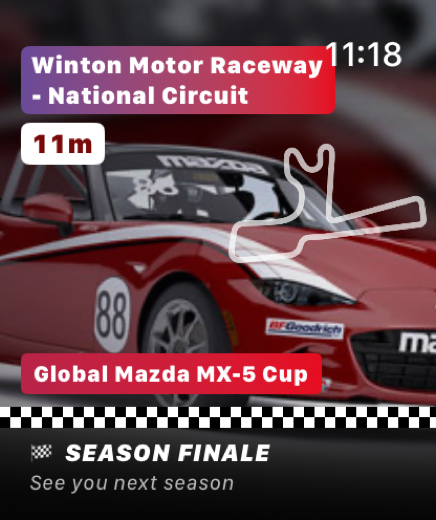
Apple Watch
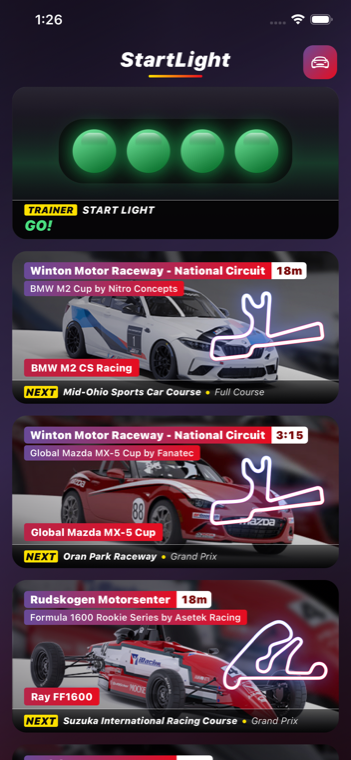
The app + start-lights game
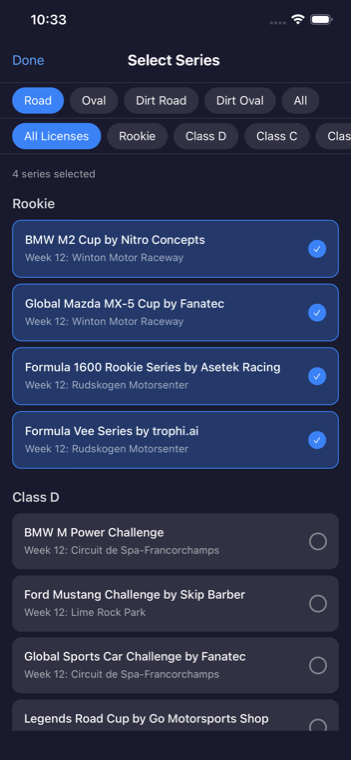
Pick your series

iRacing changes tracks every Tuesday.
The widget follows a schedule with three rules.
TUE 00:00 UTC
The weekly rollover
Every official series moves to a new track at midnight UTC on Tuesday. A season runs 12 weeks, then a break week, then the next season starts.
EVERY 30–60 MIN
Sessions on a cadence
Each series races on its own fixed timer: every 30 minutes for some, hourly for others, at the same offsets all week long.
REGISTRATION
The window to get in
When the timer hits zero the next session launches. If you're not registered by then, you wait for the next cycle.
How seasons, weeks, and licenses fit together: iRacing seasons & schedule in the Manual.
Native SwiftUI. $9.99, once.
NATIVE SWIFTUI
Real WidgetKit widgets and a native Apple Watch app, written in SwiftUI. Tap-to-cycle is an App Intent, so the widget updates in place without launching the app.
NO LOGIN, NO ACCOUNT
Startlight never asks for your iRacing credentials. The current-week schedule loads on its own and the widget keeps itself current through the Tuesday rollover.
NO DATA COLLECTED
Your series picks and settings stay on your device. No tracking, no ads, no analytics SDKs.
PAY ONCE
A one-time $9.99 purchase covers the iPhone and iPad app, both widget sizes, and the watch app. Built by one racer who was tired of loading a website to check the week's track.
one-time · iOS & watchOS
One purchase. Updates included.
Questions.
What does Startlight actually show me?
One card per series you follow: this week's track, its map outline, next week's track, the car, the race week, and a timer to the next session. The small widget leads with the track and timer; the medium adds the car, race week, and next week's track.
What is the countdown counting down to?
The next session launch. Official sessions repeat on a fixed cadence (every 30 or 60 minutes depending on the series), so the timer is how long you have to register before the next one goes up. Over an hour it reads 2h, then minutes, then a seconds count inside the last four minutes.
Do I have to log in with my iRacing account?
No. Startlight never asks for your iRacing credentials: nothing to sign into, no password to manage. The current-week schedule loads on launch; your picks and settings stay on your device. Nothing is collected.
How is it different from the iRacing Companion app or planners like iRacePlan and RCRPlanner?
Those are full apps you open. Startlight is a Home Screen widget and Apple Watch app you glance at: the week's track and a live session timer, in your local time instead of UTC. See schedule tools for how the planners compare.
Which series and categories does it cover?
Every official iRacing series across Oval, Sports Car, Formula Car, Dirt Oval, and Dirt Road. You pick which to follow, and it tracks the weekly rotation as the season moves. Full list on supported series.
What's the start-lights game?
A Formula-style five-light sequence: wait for lights out, then tap as fast as you can. It logs your best reaction time. The app is named after it.
Is the widget on this page the real app?
It's a web build of the real widget: same live current-week iRacing schedule, same countdown math, rotating through a sample of series. The iOS version adds tap-to-cycle, two sizes, and the Apple Watch app.
Where's your series this week?
iPHONE · WIDGET · APPLE WATCH · $9.99 ONCE