What to bind to your sim racing wheel buttons
A wheel and a button box do nothing until they are mapped, and the goal is simple: never reach for the keyboard mid-stint, and find every control blind. That last part matters most in VR, where you cannot see the wheel face at all. One rule organizes the whole layout: car-specific controls go on the wheel; universal, set-once controls go on a box or the keyboard. Brake bias, TC, ABS, and engine map change with every car, so they earn a permanent home under your thumbs. FOV and replay controls you set once, so they do not. The copyable default map is one screen down.
Encoders step, buttons pulse, toggles latch
Section titled “Encoders step, buttons pulse, toggles latch”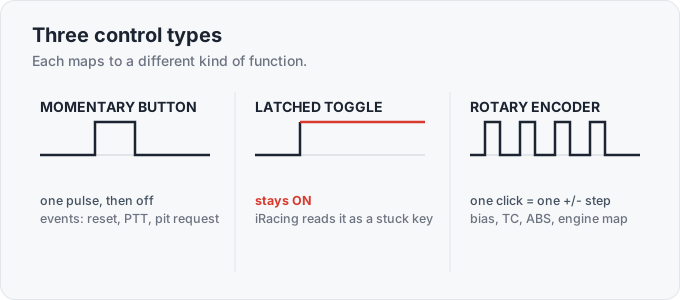
Every input on a wheel is one of three things, and each is built for a different job.
- Momentary button fires one pulse when pressed and stops when released. This is for one-shot events: active reset, push-to-talk, headlight flash, pit request, fast repair, tear-off. Most buttons on a rim are momentary.
- Latched toggle stays closed in the ON position. iRacing reads a permanently-closed switch as a held key, so it toggles on-off-on-off or gets flagged as stuck. Only a few functions accept a real switch state (covered below).
- Rotary encoder is the “four spinning buttons,” the thumb encoders, and face rotaries on a sim wheel. Each detent click sends one momentary
+or-pulse. That is exactly what a stepped, adjustable setting wants, which is why bias, TC, ABS, and engine map belong here and nowhere else.
No pot on bias. iRacing, AC, and ACC take a relative +/- input for bias, TC, and ABS rather than an analog axis, so a fixed-position potentiometer will not bind at all. Even if it did, a pot’s absolute value would drift out of sync the moment a pit stop changes the setting.
VR is no exception. Drivers who want a fixed-position knob for muscle memory are out of luck; the encoder is mandatory.
If a DIY encoder feels laggy or double-steps, that is an Arduino firmware bug (delay() polling instead of interrupt pins, or a transitions-per-click mismatch), not a flaw in using encoders for bias.
A sensible default map that keeps both hands on the wheel
Section titled “A sensible default map that keeps both hands on the wheel”This is the core set that keeps both hands on the wheel through a race. Encoders are marked, the rest are momentary buttons.
- Brake bias +/- (encoder), the single most-bound adjustable.
- Traction control +/- (encoder), plus TC Override / cut on a button for a one-lap full cut.
- ABS +/- (encoder).
- Engine / fuel map (rotary), and Push-to-Pass / P2P / DRS on a button where the car has it.
- Black-box / MFD page up-down and value +/-, best on a funky switch (a directional toggle that pushes up/down/left/right plus a center click): up-down to cycle the F2/F3/F4 box pages, left-right to change the value.
- Pit limiter, pit request, and pit cancel.
- Pit service (clear tires, tires on/off, enable autofuel) on a spare button or dial, so strategy calls don’t pull you into the black box.
- Active reset / exit / tow, fast repair, and windshield tear-off.
- Push-to-talk for radio.
- Look-left / look-right as a quick single tap, plus look-back.
- Headlights, headlight flash, and high-beams.
- Wipers / wiper-speed step for rain.
Two binds people get wrong by name.
Headlight flash. Borrowed from real endurance racing, where a faster class flashes a slower car to say a pass is coming. The community is split on it: some treat it as a courtesy, others find it pointless or rude, so it signals intent at best, not a rule.
Wrong label, dead control. The in-game functions are labeled “Headlights” versus “High beams,” “Wipers” versus a wiper-speed step, so binding the wrong one makes the control look dead.
Look-left/right goes on a tap rather than a held look so a glance keeps the track ahead in frame. On a single screen it still swings your eyes off the apex at the wrong moment, which is why single screens need a radar.
The car decides how busy the wheel gets
Section titled “The car decides how busy the wheel gets”- GT3 / GT4 / GTP is the busiest wheel. Bias, TC, ABS, engine map, and often front/rear ARB and brake migration all live and change during a stint, and a long race adds pit-service and fuel binds. This is where all four thumb encoders earn their keep. GT3: which car and where to race covers the cars themselves.
- Open-wheel / formula has fewer live adjustables, so the rim is simpler: Push-to-Pass or DRS, bias, and a fuel mix. Many formula rims are screenless, so the funky switch and a clean black-box bind matter more.
- Oval / NASCAR wants big easy-reach buttons and a large push-to-talk you can find with a glove on, plus the car’s live chassis adjuster where it has one: a track bar on the stock cars, a weight jacker on IndyCar. Far fewer face controls to spin; the value is in buttons you can hit without looking.
- Rally / dirt and road / historics lean on a sequential shifter and a handbrake for most of the work, plus ignition and starter. Fewer electronics, more mechanical inputs. H-pattern vs sequential covers the shifting side.
Dual-clutch paddles set a bite point for the standing start
Section titled “Dual-clutch paddles set a bite point for the standing start”Beyond the two shift paddles, a “dual-clutch” wheel wires two extra paddles as analog clutch axes. The launch: pull both at the start, release one to a preset bite point, then dump the second at the green. iRacing’s built-in Launch Trigger (added in 2024 Season 2) does the same job with one control: cap the clutch pedal’s range just below full so a released pedal sits at the bite point, hold the trigger to keep the clutch fully disengaged on the grid, and release it at the green for a clean standing start without juggling two paddles. iRacing ships the Launch Trigger as a stock mechanic, so it is legal. The full launch technique is on shifters, paddles, and dual-clutch.
iRacing reads a latched toggle as a stuck button
Section titled “iRacing reads a latched toggle as a stuck button”iRacing reads a maintained switch left ON as a held button, so it toggles erratically or flags it. Keep most functions on momentary buttons or encoders. A few things can live on a real toggle, because the mapper lets you flip the switch and press Enter to register that position as a switch state: ignition and wipers register cleanly this way, and the pit limiter usually can too.
The common ignition build mirrors a real race car: a covered toggle for ignition that stays on, plus a separate momentary push-button for the starter. Flip the cover up, throw ignition, press start.
One thing the limiter does not do: in iRacing the pit speed limiter cuts the ignition to cap engine output. It does not apply the brakes, and it relies on engine braking to hold speed. So it only reliably holds pit speed in 1st or a low gear, where engine braking is strong; in a high gear rolling downhill the car can pick up speed past the limit because there is little engine braking to bleed it off. Drop to 1st before you trust it.
It also still burns fuel. The limiter cuts ignition rather than fuel, so sitting on it in 1st gear consumes nearly as much as full throttle. In a long fuel-save stint, coasting through the pit lane in a high gear at low throttle is meaningfully cheaper than holding the limiter, though you give up the speed-cap safety net. On the NASCAR stock cars, the pit-limiter speed readout only reads accurately in 2nd gear, so the standard move is to drop to 2nd on pit approach.
A modifier button and a funky switch double a small rim
Section titled “A modifier button and a funky switch double a small rim”Smaller rims and button-light formula wheels run out of space fast once you stack bias, ABS, TC, map, pit, lights, PTT, look, and reset. Two fixes:
- Map two simultaneous buttons for a function. A multi-purpose modifier (your own
Fn, like Ctrl or Alt) fires only when held with another button, which roughly doubles the buttons on the rim. This is the standard VR fix. Binding enter/exit-car to both shift paddles at once is a common version of the same trick. - Use a funky switch for all black-box navigation. One directional toggle (up/down/left/right plus a push) cycles every box page and changes values, so you do not spend four buttons on it.
To share one physical button across a wheel, a box, and a Stream Deck, and to keep binds consistent across hot-swap rims, use SimHub Control Mapper or your wheel software’s mapper (Maglink for Simagic, the Fanatec and Moza tools).
SimHub Control Mapper. Routes inputs through a virtual device and maps by role name, so swapping a rim remaps the roles instead of every game bind. It has supported Stream Deck since 8.3.4.
Maglink. Simagic’s hardware-and-software bridge that lets a Simagic rim run on a third-party base and expose its controls the same way.
In VR. Choose binds you can find by shape and feel: a funky switch, a guarded toggle, the four encoders in fixed corners. The hardware side of overflow is the button box buying and building guide.
Set-once controls stay on the keyboard
Section titled “Set-once controls stay on the keyboard”Anything you set once or use out of the car stays off the wheel: pause, FOV, camera and seat height, replay and save-replay, audio and spotter volume, and chat beyond two or three macros (“sorry,” “thanks,” “good race”). Pause is keyboard-only by default, so if you race solo, bind it to the box rather than reach across the desk. Keep the car-specific live controls (bias, TC, ABS, map, ignition) on the wheel where your thumbs already are. The button box page draws the same line for the overflow.
Frequently asked questions
What buttons should I map first on a new sim racing wheel?
Map the controls you need without taking a hand off the wheel: brake bias +/-, TC +/-, ABS +/-, pit limiter, pit request, black-box page and value, active reset, push-to-talk, look-left/right, headlights and flash, and wipers. Put the +/- adjustables on the thumb encoders and the one-shot events on momentary buttons. The full sensible default map is in the body below, and which way to move bias, TC, and ARB mid-race covers what to do with them once they are bound.
Should brake bias go on a button or a rotary encoder?
An encoder. Bias, TC, ABS, and engine map are stepped relative inputs, where one detent click sends one + or - pulse, which is exactly what the wheel's thumb encoders do. You cannot bind a fixed-position potentiometer to bias in iRacing, AC, or ACC; the sim only accepts a relative input, and a pot's absolute value would drift out of sync with the car anyway. See how brake bias works.
Why does iRacing think my toggle switch is a stuck button?
A latched switch left in the ON position reads as a held key, so iRacing flags it or toggles on-off-on-off. Map most functions to momentary buttons or encoders. Ignition and wipers register cleanly as switch states (flip the switch, then press Enter in the mapper to capture that position), and the pit limiter usually can too. The covered-toggle ignition plus momentary-starter build lives on a button box.
How do I bind pit stop options like fuel and tires to my wheel in iRacing?
iRacing's pit-service choices (add fuel, clear or change tires, fast repair, tear-off) are bindable commands and chat macros, so you can put 'clear tires,' 'tires on/off,' and 'enable autofuel' on wheel buttons or a dial and set strategy without opening the F4 black box. Endurance drivers map a dial to it so a pit call is a flick, not a menu dive. The button box is the usual home for the overflow.
How do I bind the dual-clutch bite point for standing starts?
Wire the two extra paddles as analog clutch axes: pull both off the line, release one to a preset bite point, then dump the second at the green. iRacing's built-in version (the 'Launch Trigger,' added in 2024 Season 2) is simpler: cap the clutch pedal's range just below 100% so a fully released pedal already sits at the bite point, then hold a button or paddle to keep the clutch fully disengaged until the green and release it to launch. It is a built-in mechanic, not cheating. The full launch sequence is on shifters, paddles, and dual-clutch.
What should I leave on the keyboard instead of the wheel?
Set-once and out-of-car controls: pause, FOV, camera and seat height, replay and save-replay, audio and spotter volume, and any chat beyond two or three macros. Keep the car-specific live controls (bias, TC, ABS, map, ignition) on the wheel. A button box is the home for the overflow.