
Sim racing FOV and seating position, settled
The “FOV police” on r/simracing will look at your stream and “arrest” your field of view. The top post in the genre jokingly books Formula 1 race winner Pierre Gasly for running the wrong FOV on his sim rig, and it pulled nearly 1,500 upvotes. The tone is gatekeepy, but the mechanism it points at is real: a wrong FOV costs you depth perception and consistent braking points. This page explains why the correct number works, so you can set it because you understand it.
What FOV actually is
Section titled “What FOV actually is”Horizontal field of view is a pure-geometry function of two things: your screen width and your eye-to-screen distance. That is the whole input set:
hFOV = 2 × atan( (screen width / 2) / eye distance )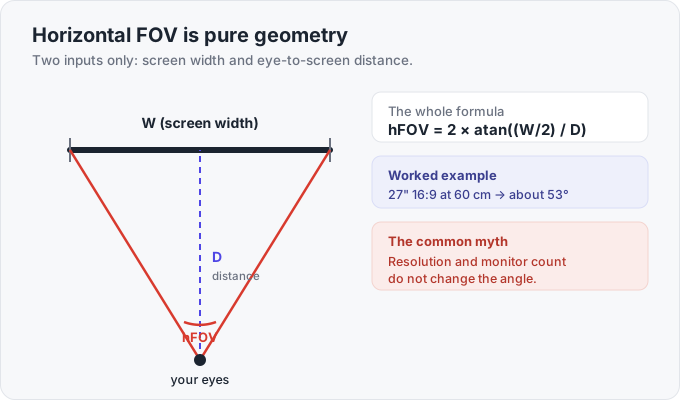
Resolution does not enter that equation. Monitor count does not enter it either. A creator who makes FOV videos says he gets comments weekly insisting that resolution sets the FOV. It does not, and that is the single most common myth in the topic. A 4K 27-inch screen and a 1080p 27-inch screen at the same distance want the exact same FOV number, because they are the same physical width. Pixels change how sharp the image is, not how wide the angle is.
Correct FOV makes an on-screen object the same angular size it would be through a real windshield at that distance. Match that, and depth perception, braking markers, and the sense of speed all line up with reality. That is the entire reason to set it.
Why correct FOV looks zoomed in, and why that’s the point
Section titled “Why correct FOV looks zoomed in, and why that’s the point”The first time you set the geometrically correct number, the view looks zoomed in, like your face is pressed to the windshield. Almost everyone dislikes it at first: “I’m not crazy about the correct FOV calculation” is the standard reaction. Sit with it. The narrow, zoomed feel is exactly what restores the depth cues a wide FOV flattens out. After a few sessions you stop noticing the framing and start braking at the same marker every lap, because the marker now arrives at the size and rate your eyes expect. The payoff is consistency, not comfort on day one.
Why too-wide FOV is the real trap
Section titled “Why too-wide FOV is the real trap”The “wider is better because I can see more” instinct is the trap. A wider-than-correct FOV shrinks the entire world and pushes everything into the distance. The cost is your speed sense: a too-wide FOV tricks you into thinking you are going faster than you are. Your braking markers then look smaller and farther than reality, so they arrive late, and you brake late to match a speed that is not there. Triples can push the total angle well past what a real cockpit shows you, but going wider than the geometry calls for buys immersion, not pace.
There is a credible dissent worth knowing. A minority of fast drivers deliberately run a touch tighter than correct on a single screen, because zooming in enlarges the part of the track you’re driving into and slows the apparent speed, as one much-upvoted r/assettocorsa comment puts it: “you see more of the important bits (where you are going) and it also looks slower and you have more time to think.” That works because it errs toward depth, not away from it. The trap is only ever the wide direction.
Setting FOV: the calculators and the cardboard
Section titled “Setting FOV: the calculators and the cardboard”Every FOV calculator needs the same two numbers: screen width and eye-to-screen distance. Measure the distance, because that is the input people guess at and get wrong. “How far are you from your screens?” is the first question any FOV thread asks. Good ones:
- fovcalc.app and simracingcockpit.gg/fov-calculator for quick single-screen and triple math.
- dinex86.github.io/FOV-Calculator and sampsoid.com/fov-calc are community favorites for triples.
- SimRigBuild Screen Planner (simrigbuild.com) is the one to use when bezels and curve matter, because it does the bezel-gap and curvature math.
One thing the calculators output that trips people up: the FOV number is per sim. iRacing, ACC, and AMS2 take a degree value close to the geometric one, the F1 games roughly double it, and a few titles want radians, so a number copied off a YouTube setup for another game will be wrong. Take the angle from the calculator and enter it in the units your sim uses.
In iRacing you do not even need the website. Adjust FOV in-car with the [ and ] keys (or Ctrl+[ and Ctrl+]), fine-tune the seat in the iRacing Camera Tool at Ctrl+F12, and iRacing ships a built-in FOV Calculator in the graphics options. If you distrust software entirely, use the cardboard trick: cut a piece of cardboard the size of your screen, hold it at your real seating distance, and what you can see through that “window” is your correct FOV. The math just turns that picture into a number.
Single vs triple vs VR
Section titled “Single vs triple vs VR”These are three different problems.
- Single screen is per-screen FOV, and correct FOV crops your mirrors and the car alongside you out of frame. That blind feeling is real, so a slightly wider FOV is a fair compromise here. Pair it with a radar overlay (iOverlay radar bars) to get the side awareness back rather than cranking the number sky-high.
- Triples are total-angle FOV, and the side panels physically restore the field of view. Run the geometrically correct number; the panels mean it never feels claustrophobic. Around 700 mm eye-to-center is a common target, with the side screens angled in 45 to 60 degrees each. Full geometry is on the triple monitor setup page.
- VR has FOV fixed by the headset optics, so a Meta Quest 3 gives you what it gives you. You cannot dial it in, so do not try. Set your IPD to match your pupils and use the in-game seat move; stereoscopic depth does the job FOV tuning does on a flat screen. iRacing’s eye-tracked foveated rendering (added in 2025) is a separate performance lever for headsets that support it, not an FOV control. The triples vs VR comparison covers the tradeoff.
Curved-screen caveat
Section titled “Curved-screen caveat”Curved monitors, including the Samsung Odyssey G9 49-inch and 57-inch super-ultrawides, render flat in-game, because the sim has no idea your panel is bent. The image projects as if the screen were a flat plane, so geometry near the curved edges is stretched relative to what the flat math assumes. There is no in-sim setting that undoes the curve, so treat the calculator number as a starting point and nudge FOV down about 5 degrees by eye until the on-track scale looks right. On curved triples the same logic applies at each bezel join; for a single curved ultrawide there is no seam, just edges that bow.
Seating geometry, settled
Section titled “Seating geometry, settled”Most sim racers want GT/touring geometry, not the reclined formula position. Copying an F1 driver’s pedals-up, laid-back stance is a common mistake. “It’s such a difficult position to get comfortable in,” and it causes back pain for anyone not deliberately racing open-wheel with load-cell pedals braced against the seat. The settled GT numbers:
- Seat back around 45 to 55 degrees, with the seat bottom around 30 degrees so you are not sliding forward.
- Pedals roughly level with your hips.
- Elbows near 90 degrees with hands at 9-and-3, wrists neutral.
- Hamstrings fully supported along the seat bottom.
Ricmotech’s method, measuring knee height to a false floor, is a clean way to get the pedal-to-hip relationship repeatable.
Wheel height and distance
Section titled “Wheel height and distance”Set the wheel so your arms have a slight bend at 9-and-3, never locked straight. The drape test: rest a wrist over the top of the rim with your shoulders back against the seat; if your wrist reaches the top comfortably, the distance is right. A wheel too far out forces you to reach and strains the shoulders.
Pedal angle and height
Section titled “Pedal angle and height”Raising and angling the pedal face only helps with a load-cell brake, where you brace your leg and push with real force (Moza, Simagic, and similar). On potentiometer or hall pedals you push by travel, and tilting them up just adds knee strain for nothing. Keep your heel on the floor or a heel rest. More on this in pedals: ergonomics and inverted decks.
Monitor height and horizon
Section titled “Monitor height and horizon”Center the screen horizontally on the wheel and put the top third at eye level so the horizon lands at your eye line. Keep the panel close to perpendicular to the floor, with your eyes near its vertical middle; a screen tilted back or mounted too high makes a flat road read as a hill and pushes your sense of the horizon off. The most common rig fault is a monitor mounted too high, which makes you look up at it and strains the neck. You want to be sitting up to the wheel and looking straight ahead.
Order of operations
Section titled “Order of operations”Build the rig from the body out, and set FOV last: seat, then pedals, then wheel, then monitor, then FOV. Each step depends on the one before it, and your final seating distance is the number the FOV calculator needs, so there is no point computing FOV until the seat is locked. If you are tall, heavy, or fighting pain, the seats and rig ergonomics page has the specific fixes.
Frequently asked questions
What FOV should I actually use for sim racing?
It is geometry, not preference. Feed a calculator like fovcalc.app or iRacing's built-in one your screen width and your eye-to-screen distance, never resolution or monitor count, which do not enter the formula. On a single 27-inch screen at 60 cm you land near 53 degrees; on triples the calculator gives you the per-screen number and you run it as-is. See triples vs VR for how the three setups differ.
Why does the correct FOV look so zoomed in and feel slow?
Because it matches real-world angular size, which is narrower than the wide default you were used to. The zoomed-in feel is what restores depth perception, repeatable braking markers, and an honest sense of speed. It stops feeling strange after a few sessions, and your braking points get more consistent. Don't crank it back up to feel fast again, because that fake speed is what wrecks your entries.
Is a lower-than-correct FOV actually faster?
A minority of quick drivers run slightly tighter than the calculated number on a single screen, because zooming in enlarges the track ahead and calms the sense of speed so you have more time to read a corner. It's a legitimate preference once you understand the trade: you give up some peripheral awareness and a true sense of scale for a bigger view of where you're going. Correct FOV is still the default for consistency; tighter is a tweak, not a cheat.
Do I really need correct FOV on a single monitor when I can't see my mirrors?
On one screen, correct FOV crops your mirrors and the car beside you, so a slightly wider FOV is a legitimate compromise there. Add a radar overlay (iOverlay radar bars) to replace the side awareness you lose. Correct FOV is only non-negotiable on triples, where the side panels physically hand the field of view back, see triple monitor setup.
What FOV should I use on a 49-inch or 57-inch super-ultrawide?
Treat it as one wide single screen: feed the panel's full width and your eye distance into the calculator. The catch is the curve. A Samsung Odyssey G9 renders flat in-game, so the math is a starting point and you nudge FOV down about 5 degrees by eye until the on-track scale looks right. A single 32:9 is still per-screen FOV, not triple-screen geometry.
How do I set FOV in VR when the calculator number doesn't apply?
You do not set it. VR FOV is fixed by the headset optics, so the calculator is irrelevant. Set your IPD (interpupillary distance) to match your eyes, then move the in-game seat to taste. VR's stereoscopic depth replaces the whole FOV-tuning step, more in VR headsets for sim racing.
What's the correct seating position, and should I copy an F1 driver?
Most people want GT/touring geometry, not reclined formula geometry. Aim for seat back around 45 to 55 degrees, seat bottom around 30 degrees, pedals roughly level with your hips, elbows near 90 degrees at 9-and-3, and your hamstrings fully supported. The most common correction on rate-my-position posts is seat too upright, which causes the back pain, not cures it. Seats and rig ergonomics covers tall-driver fixes.